Changelog
What’s new in Sendra
Product updates, improvements, and release notes. Subscribe by joining the waitlist — we’ll keep you posted as things ship.
SES setup is now quicker and easier to get started
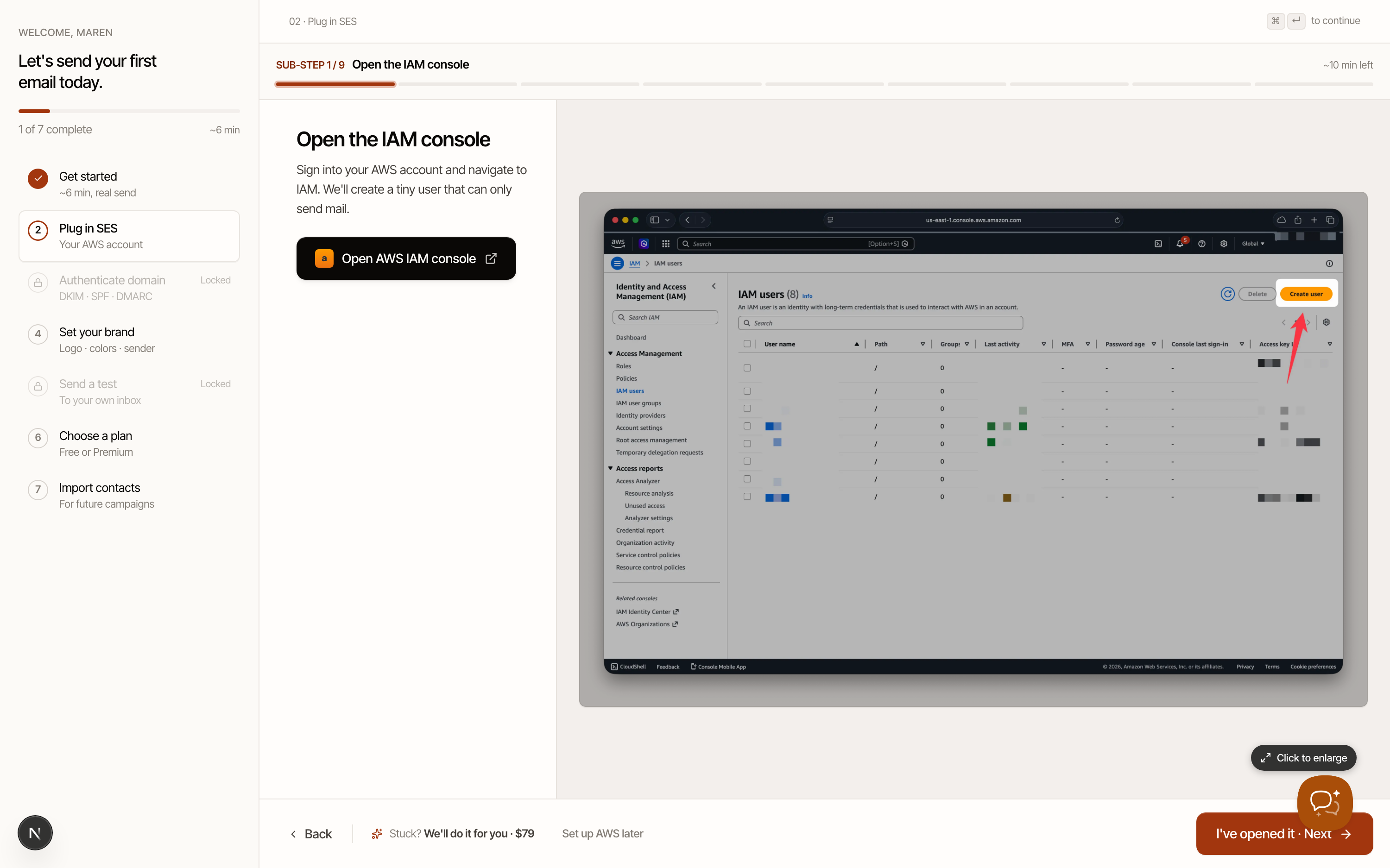
Sending through your own Amazon SES is what keeps Sendra so affordable, but it’s also the part of setup that used to ask the most of you.
The new Plug in SES step walks you through creating a send-only AWS user one clear action at a time, with an annotated screenshot of the exact AWS screen at every step. A checklist tracks your progress, and we verify the connection before you move on — so you always know exactly what to click next.
A few things that make it easier:
- Guided, with pictures. Every sub-step pairs a plain-English instruction with an annotated screenshot of the exact AWS screen.
- Set up AWS later. Not ready to touch AWS? Skip ahead and set your brand, choose a plan, and import your contacts now. Authenticating a domain and sending a test stay locked until SES is connected, so nothing sends before you’re ready.
- Or let us do it for you. Rather not deal with AWS at all? Our white-glove setup ($79) has a specialist create the send-only user, attach the right policy, set up your domain, and connect it to your workspace — then email you when it’s live.
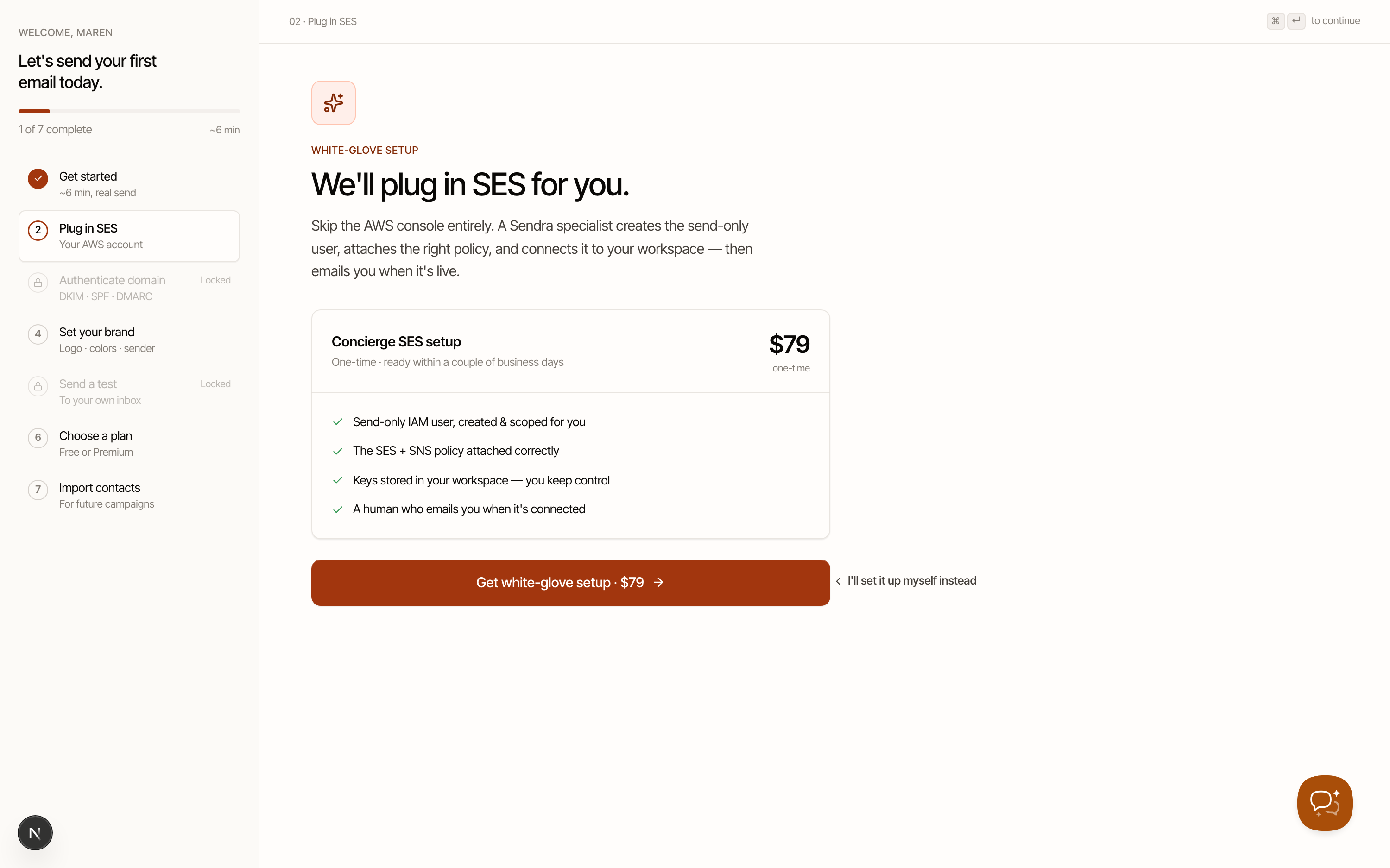
Getting from “just signed up” to “first email sent” should be as quick and easy as possible. We think these changes make it easier for new users.
Sendra is now in private beta
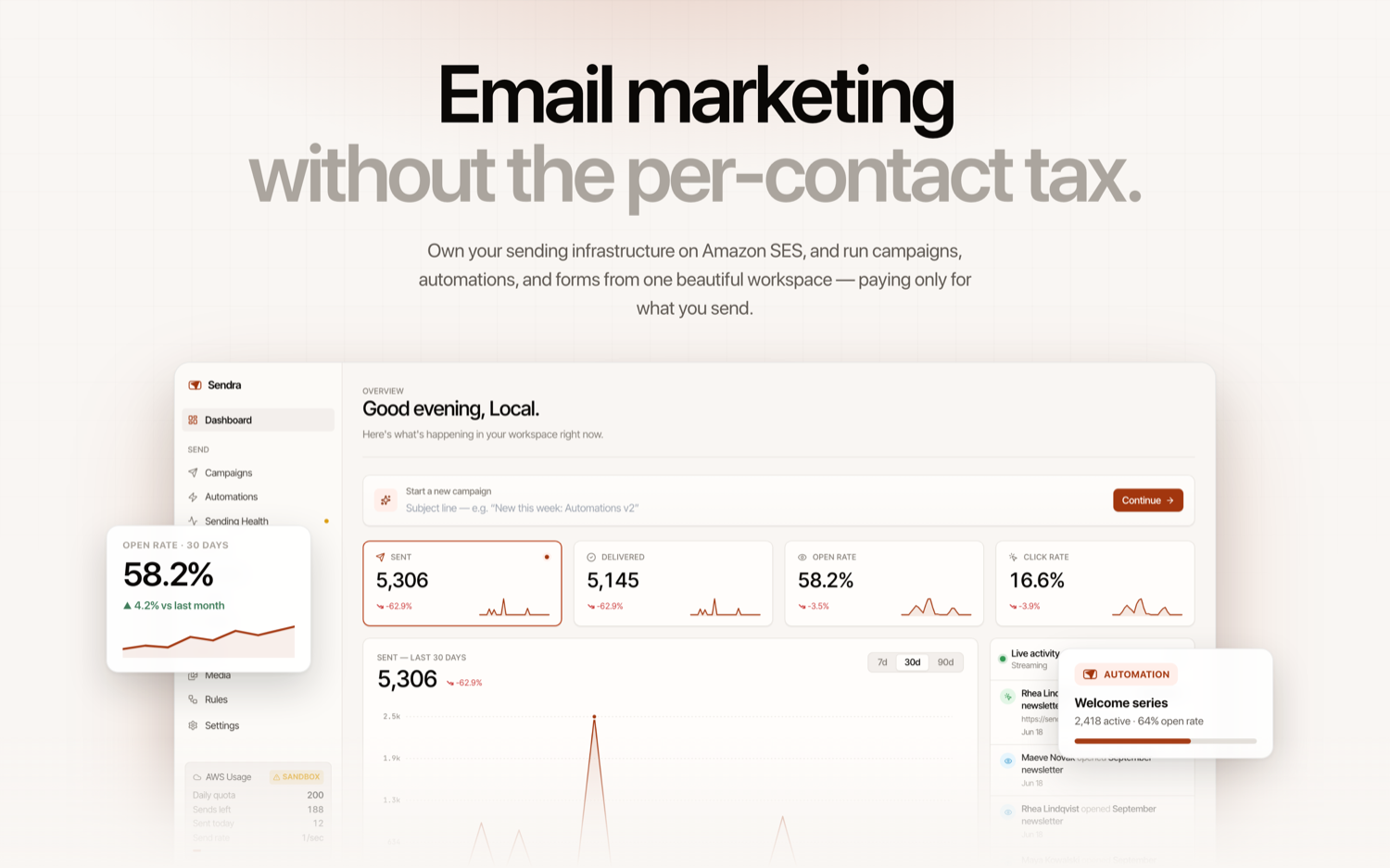
Today, we’re introducing Sendra — a new tool for anyone who sends emails to an audience. It lets you own your infrastructure and, by using Amazon’s Simple Email Service (SES), remove the “per-contact tax” found on most competing services and only pay for what you use.
BZG, like all modern businesses, sends emails. Managing your email marketing means:
- Producing your emails
- Gathering and managing contacts
- Sending your emails, and ensuring they get delivered
Many tools exist to help with this, and the vast majority charge per contact. For example, MailChimp starts at $45/mo for 500–1k contacts; Kit is $33/mo for 1k contacts. This becomes prohibitively expensive for many business owners. Under the hood, these services rely on third-party web infrastructure companies, like Amazon SES, to send emails — and then charge a gigantic markup.
Sendra democratizes email marketing for everyone:
- One of the most powerful and beautiful WYSIWYG visual email editors ever made
- Powerful contact management, custom forms with events, and API options to make gathering contacts easy
- Automations so you can create funnels and send emails automatically to your list
- Plugs into Amazon SES so you only pay for what you send — on average $1 per 10,000 email sends
- Free for your first 1,000 contacts, and $20/mo for unlimited contacts
That’s it. We’ve been using it to power BZG’s email infrastructure for the last few months and think it is the best option on the market. Sendra is available now in private beta — sign up using the waitlist here.
Beta users can also invite up to three friends to Sendra with no waitlist — and if they buy a Premium plan, you get two months of Sendra Premium for free.
A best-in-class editor
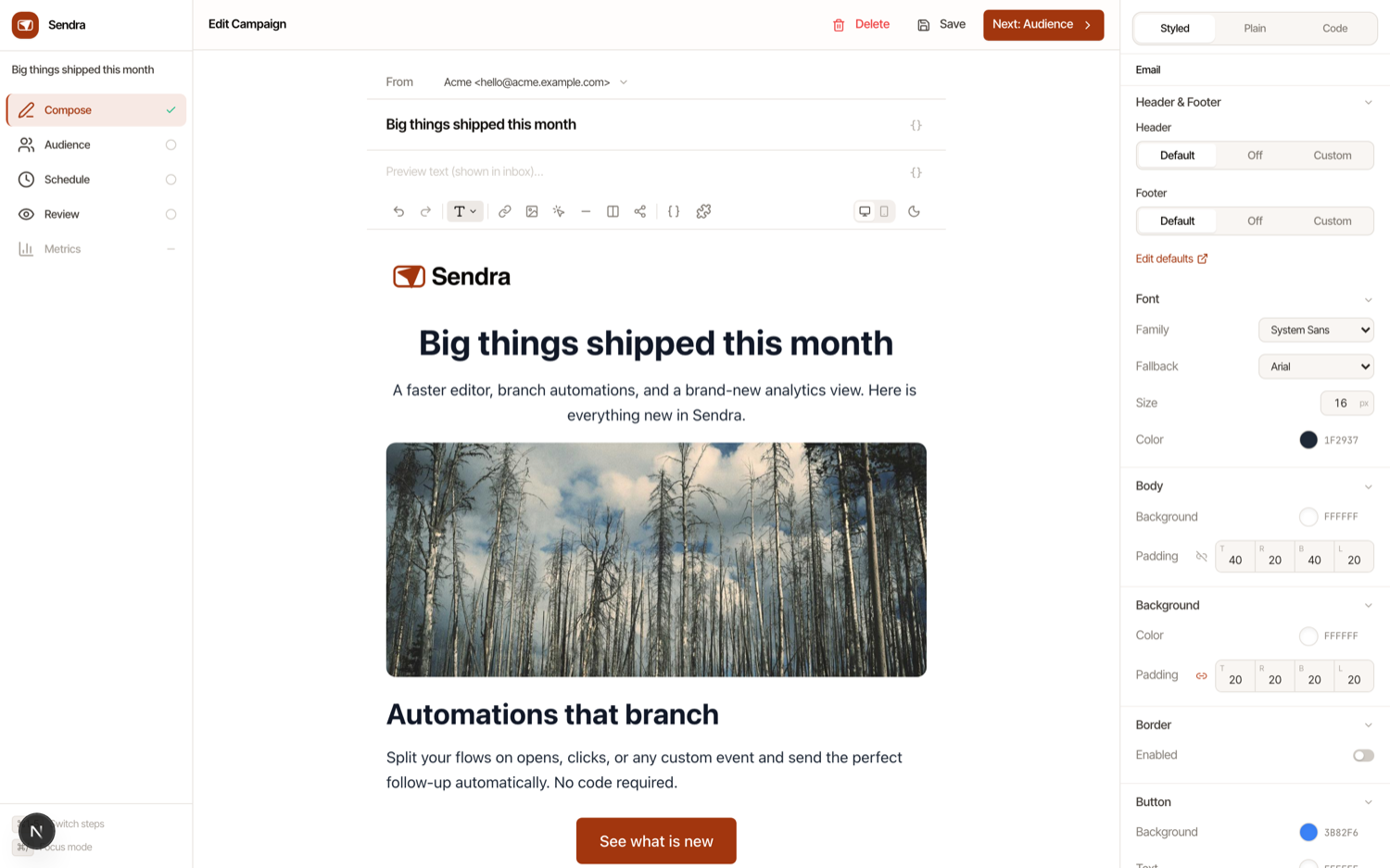
Creating emails in Sendra is fast and elegant.
- The editor lets you build a polished, on-brand email without touching a line of code.
- Type / anywhere to drop in a block — headings, text, buttons, images, dividers, bulleted and numbered lists, or a multi-column layout — and drag to reorder anything on the fly.
- Everything is styled live. A theme panel on the right controls your fonts, colors, button shapes, spacing, and width across the whole email, while a per-block inspector lets you fine-tune any individual element. Upload images straight from your computer (or just paste them in), resize them by dragging, and pull from a media library so your assets are always one click away.
- To personalize at scale, type { to insert merge tags like {firstName} or any custom property you’ve collected — each contact gets their own version automatically. Save any block or section you use often as a reusable component, so your header, footer, or favorite call-to-action is always ready to drop into the next email.
- Preview your work in desktop or mobile at any time, flip on dark mode to see how it renders for those readers, and know that brand elements — your logo, company address, unsubscribe and preference links — are handled for you so every send stays compliant.
- Sendra also has a full HTML editor, so you can customize your messages at the code level or bring in your existing email templates.
Contact management that scales with you
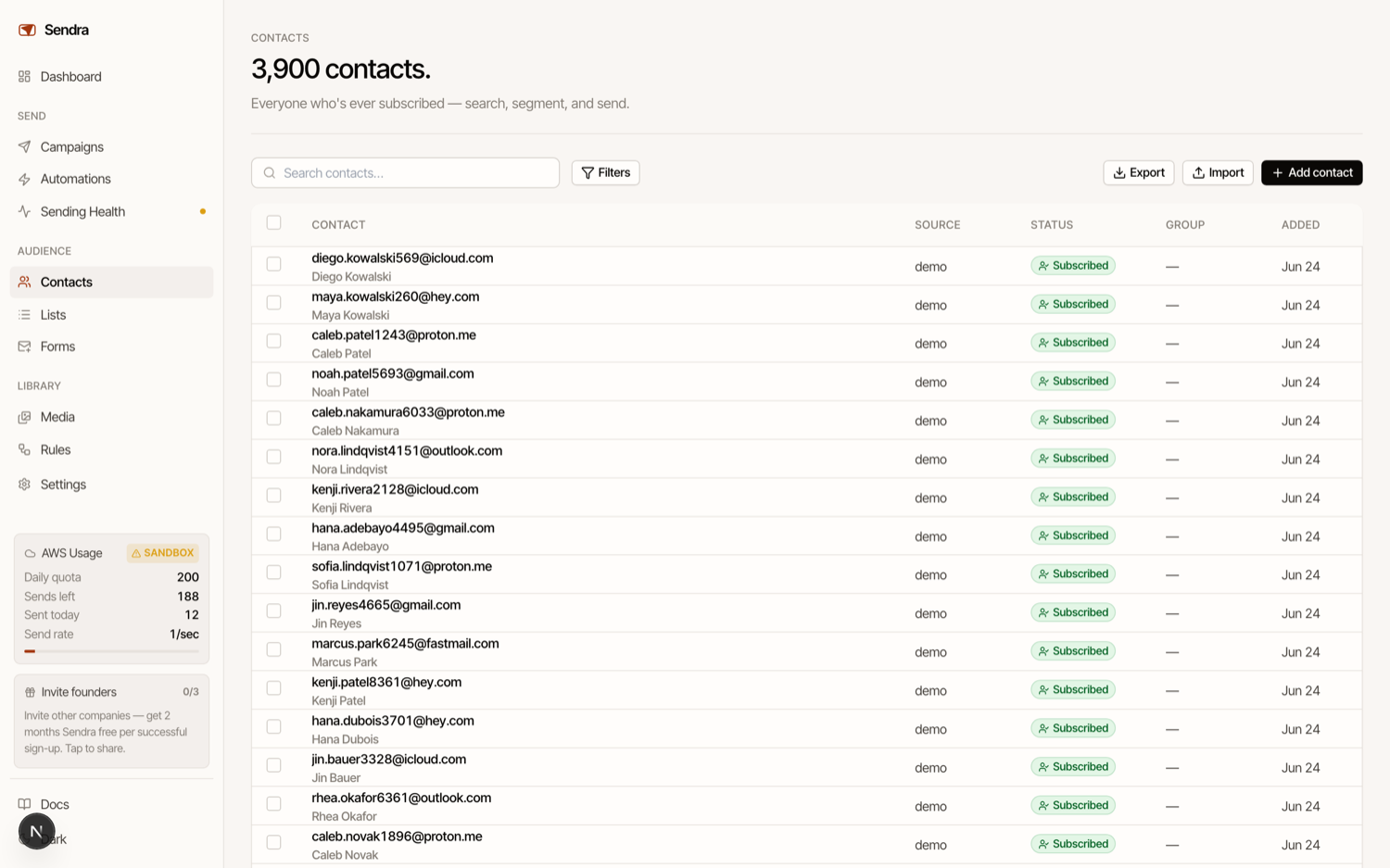
Your list lives in Sendra, organized however makes sense for you.
- Group contacts into as many lists as you like, apply color-coded tags, and build segments — saved filters that target people by any attribute, with “match all” or “match any” logic.
- Beyond the basics like name and email, define your own custom fields and store anything you want about a contact.
- Import a CSV and map your columns to Sendra’s fields (including your custom ones), add people through forms, or push them in via the API.
- Search across your whole list instantly, filter by subscription status or source, and run bulk actions — tag, add to a list, subscribe, or unsubscribe — across everyone you’ve selected.
- Every contact has a full activity timeline: sends, opens, clicks, bounces, unsubscribes, and any custom events you send. And the parts you’d rather not think about are automatic — Sendra honors unsubscribes, gives subscribers a preference center to manage exactly which lists they’re on, maintains a blocklist, and suppresses hard bounces and complaints to protect your sending reputation.
Automations for funnels that run themselves
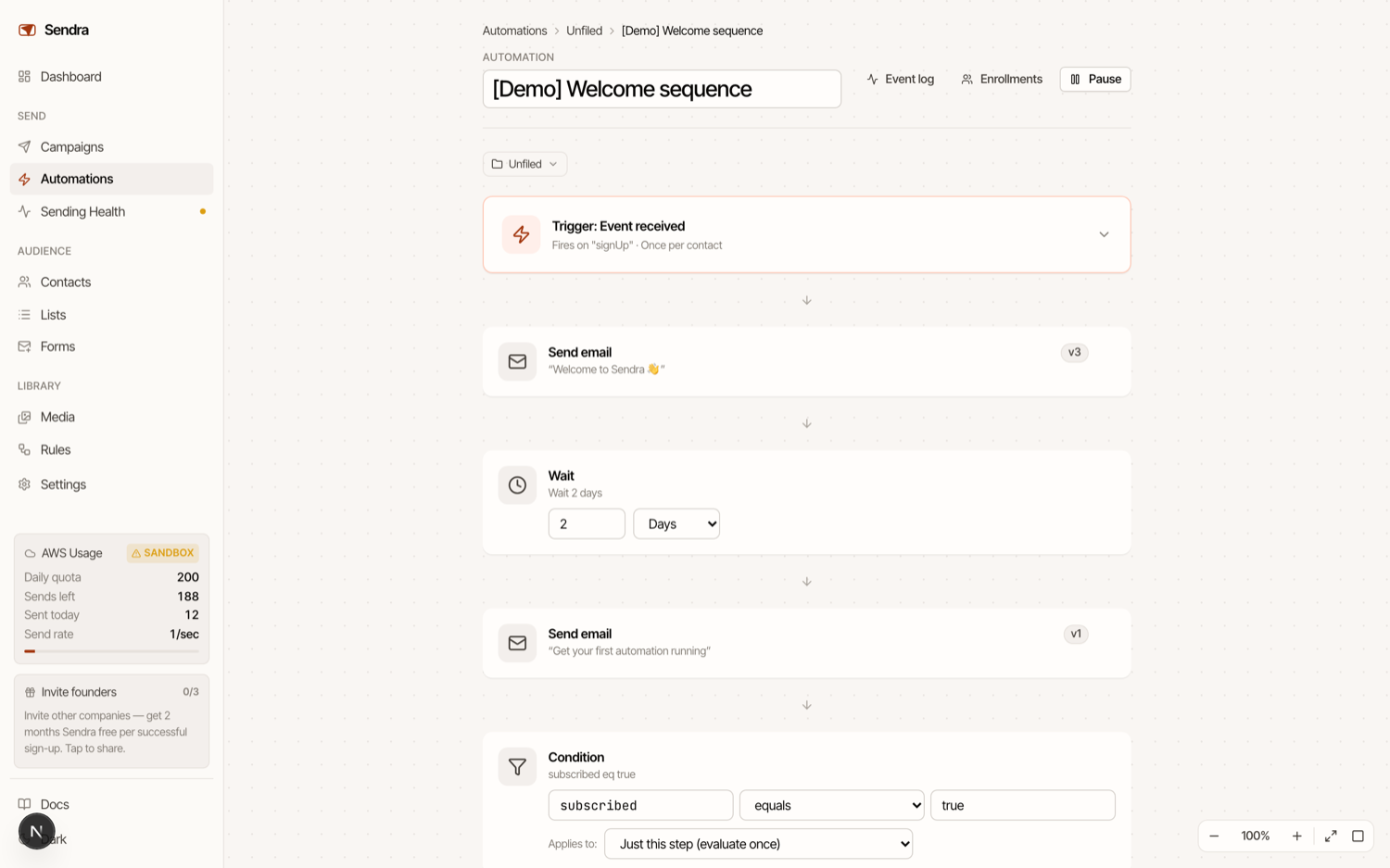
Sendra’s automations let you send the right email at the right moment, automatically. Build a flow on a visual timeline by dropping in steps and editing each one in place — no rebuilding required.
Automations start from a trigger: a new contact is added, a contact joins a specific list, a contact’s details change, or a custom event comes in through the API (a purchase, a trial start, an inactivity signal — whatever your product sends). From there, you compose the path:
- Send an email — with full access to the same editor you use everywhere else
- Wait — pause minutes, hours, days, or weeks before the next step
- Branch — split contacts down different paths based on their properties or behavior, with a fallback for everyone else
- Condition — continue or exit based on what’s true for that contact
- Experiment — A/B test variants with a traffic split and a goal event to measure against
This is great for marketing products. At BZG, we now use Sendra’s list API to automatically add users who sign up for a Unite Pro trial to an automation. It gives them tips and tricks for using Unite Pro, and once a few days pass or they purchase (via an event sent from our payment provider), they’re removed from the funnel.
You decide whether someone can enter a flow once or every time they qualify, and you can set exit conditions that gracefully remove a contact the moment they’re no longer a fit. Edits to a live automation never disrupt people already moving through it — in-flight contacts finish on the version they started on. To get going quickly, start from a template like a welcome series, a multi-part onboarding, trial-expiry reminders, or a post-purchase thank-you.
Forms to grow your list
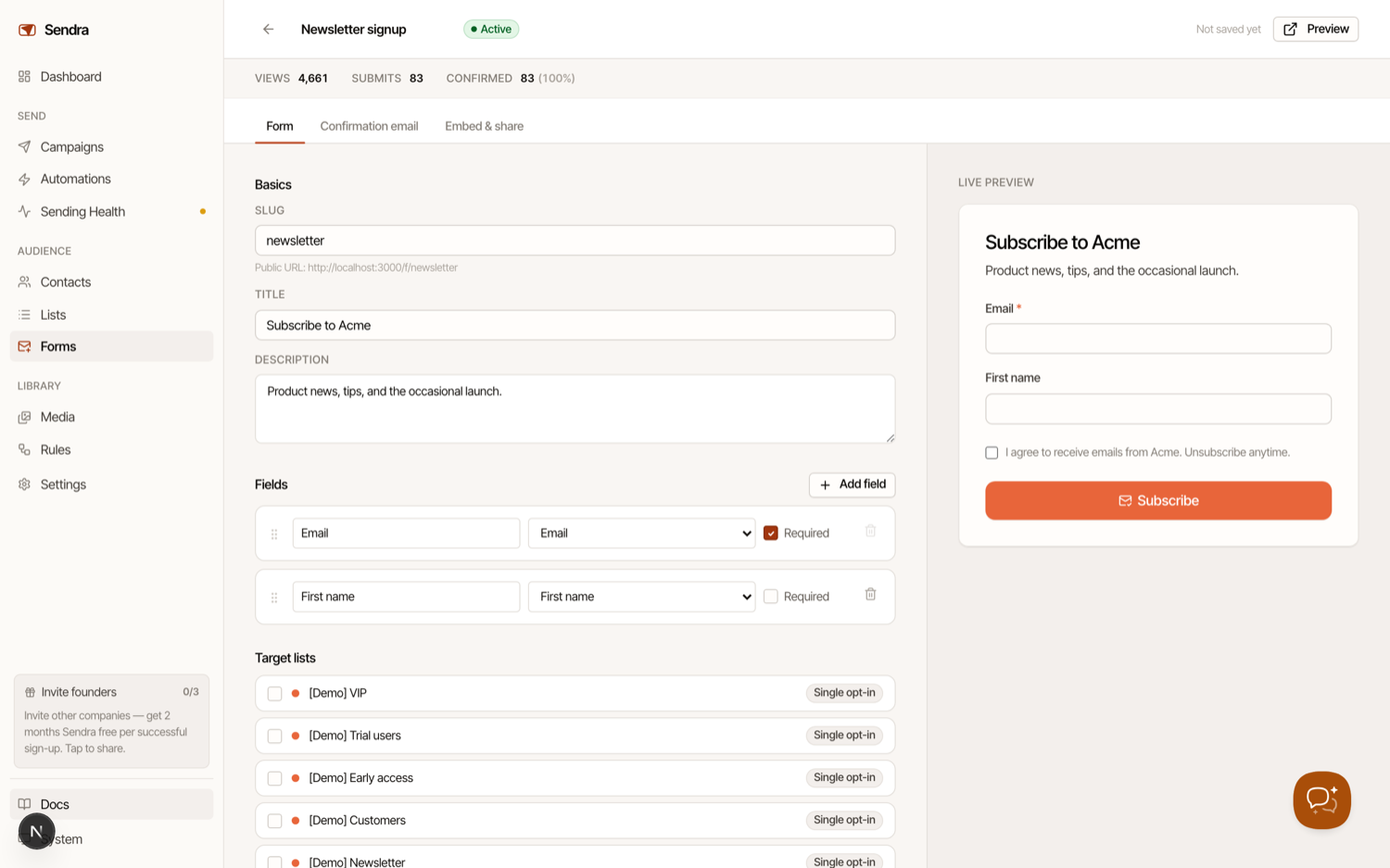
Gathering contacts should be the easy part.
- Sendra’s form builder lets you assemble a signup form in minutes — start with email, first name, and last name, then add fields for any custom property you want to collect.
- Drag to reorder, mark fields required or optional, and write your own labels and placeholders.
- Every form gets a hosted page at its own link, or you can embed it anywhere with a single snippet — it resizes itself to fit your site and can match your accent color.
- New signups flow straight onto the lists you choose. For lists that use double opt-in, you can design the confirmation email right inside Sendra, so the whole subscribe-and-confirm experience is yours end to end.
- Forms are built to keep your list clean and compliant: a customizable consent checkbox, consent records stored with every submission, your company details on file, and protection against spam through an invisible honeypot, optional CAPTCHA, and rate limiting. And because every form tracks views, submissions, confirmations, and conversion rate, you’ll always know which ones are actually working.
Send to your whole list in a few clicks
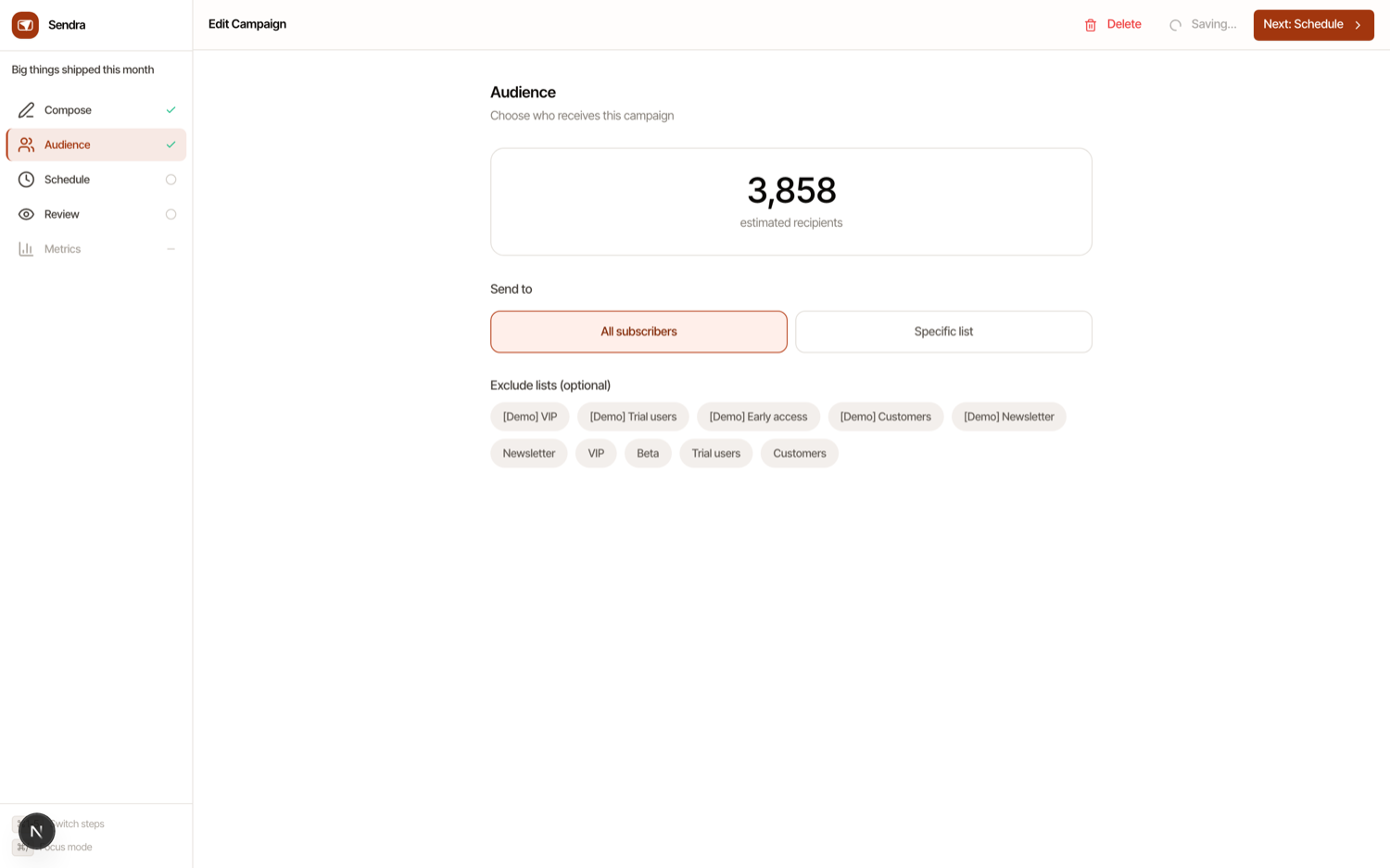
When your email is ready, sending it is simple.
- Pick who it goes to — your entire audience or any specific list — exclude anyone you’d rather skip, and choose to send right now or schedule it for later down to the date and time.
- Not sure which subject line will land? Run an A/B test: Sendra sends competing subjects to a slice of your list, watches which one performs, and sends the winner to everyone else automatically.
- Whether it’s a weekly newsletter, a product announcement, or a one-time blast, a campaign goes from draft to delivered without a detour through code or settings.
Know exactly how every send performed
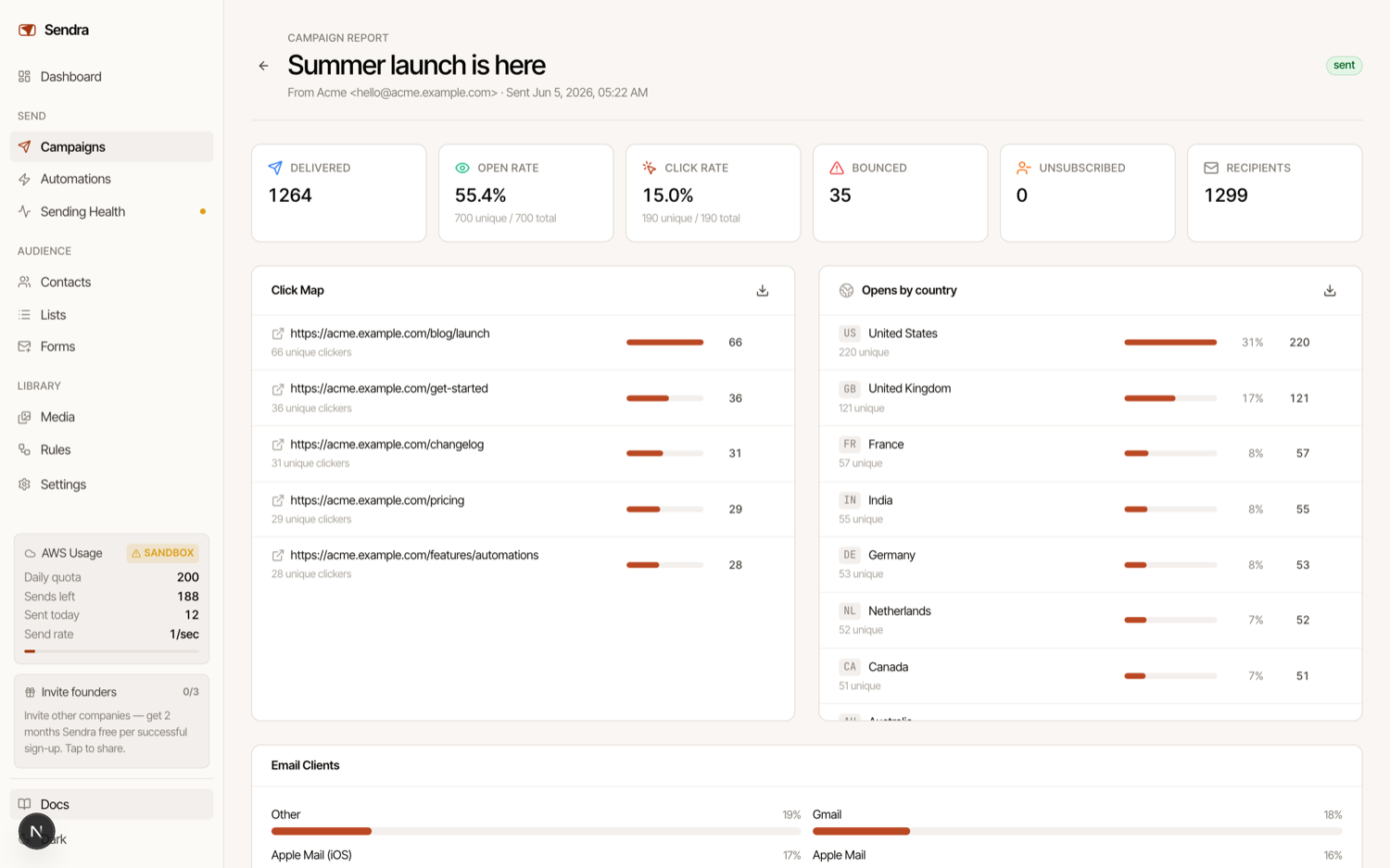
- Every campaign comes with a full report: open and click rates, how many emails were delivered, who bounced, and who unsubscribed.
- Dig into a click map to see exactly which links people tapped, break opens down by country and email client, and drop all the way to the per-recipient level to see who opened, who clicked, and when.
- Need the raw numbers? Export them to CSV anytime. You’re never guessing what’s working — the data is right there.
Built to plug into the rest of your stack
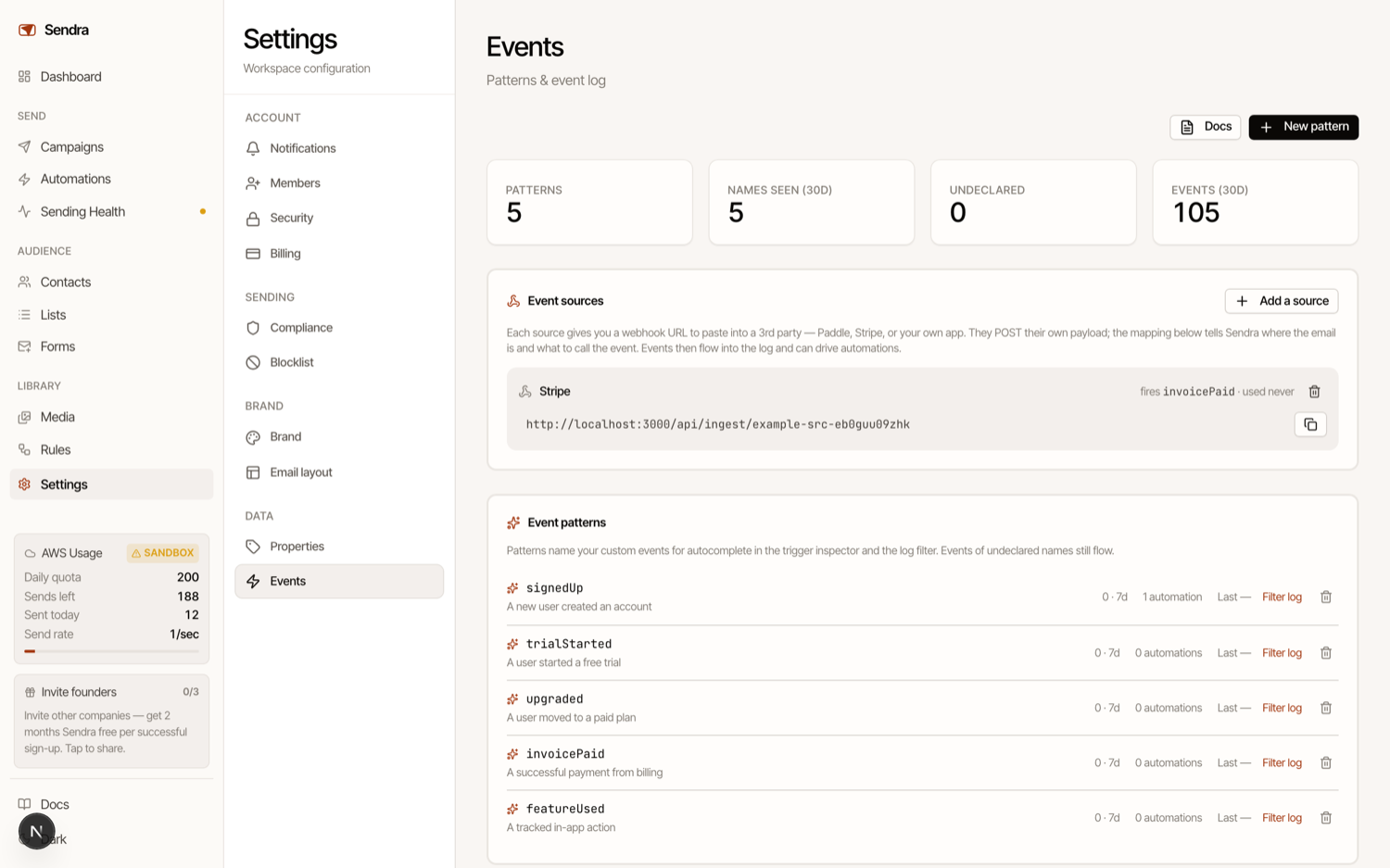
Sendra isn’t a walled garden.
- Push contacts and fire custom events straight from your own app through the API — a signup, a purchase, a trial start, an inactivity signal — and use them to trigger automations or update contacts in real time.
- You can also ingest events from third-party tools via webhooks, with simple field mapping so the data lands where it should.
- On top of that, Rules let you turn any event into an action without writing code: when something happens — a contact unsubscribes, a campaign finishes, an email bounces — Sendra can tag the contact, add or remove them from a list, notify you, or call a webhook of your own.
How is it so cheap?
Sendra uses Amazon’s Simple Email Service to send your emails. If you’re not already an SES user, onboarding takes a bit longer than competing services, but the savings are significant.
During onboarding, you’ll create an Amazon AWS account. Once that’s done, you’ll create a new user identity key to let Sendra send emails through your AWS account. If you’re new to SES, you’ll start in Sandbox mode, which only allows 200 emails a day. Sendra will guide you to request access to Production mode, which usually takes a few days and typically starts at 50,000 emails/day.
Amazon’s infrastructure verifies you own your domain, and then Sendra routes your emails to whichever contacts you choose. Amazon charges around $1 per 10,000 emails on average (this can fluctuate very mildly depending on the size of your email).
How can I join the beta?
We believe Sendra is in great shape and have tested it extensively. To be cautious, we’re letting users in slowly and will scale up over time to ensure stability and iron out any issues.
You can sign up for the Sendra waitlist here. Priority is given to users of previous BZG applications.
Thank you once again for your support and for enabling us to build great software. We’re excited for you to get your hands on Sendra and hope to share more soon.